Free, open-source alternative to Cleanup
Your camera roll, cleaned in one tap.
An Apple Shortcut that asks what’s eating your storage, finds old screenshots, long videos and blurry junk photos, and clears them all with one iOS confirmation. No app, no subscription.
iPhone only. Sign in with publik to download.
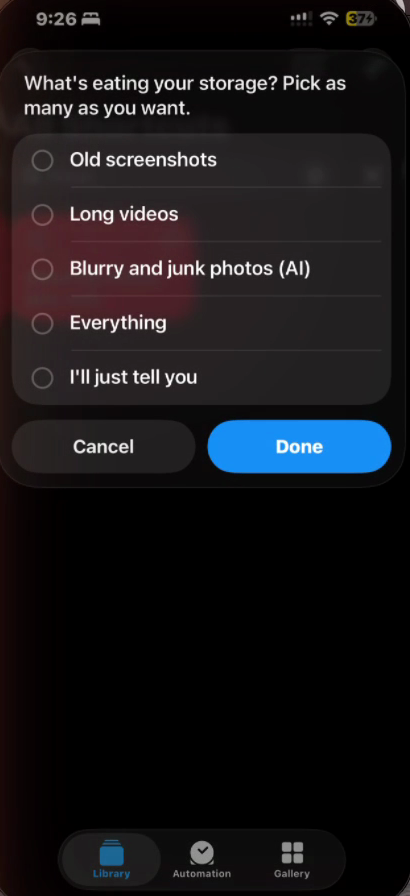
It asks, you pick, it cleans
A few quick questions, only for what you chose. Then one summary and one delete.
- 01
“What's eating your storage?”
Old screenshots, long videos, blurry and junk photos, everything, or just tell it in your own words.
- 02
“Keep screenshots from the last…”
A week, a month, three months, or clear them all. Favorites are skipped.
- 03
“Which videos can go?”
It lists your longest videos and you pick. Nothing long gets deleted sight unseen.
- 04
“Found 412 screenshots, 9 videos, 63 junk photos. Delete 484?”
Then iOS asks one last time. Everything goes to Recently Deleted for 30 days.
The AI looks at your photos, you choose which AI
For blurry, accidental and one-time photos (pocket shots, receipts, parking spots), each recent photo gets a quick look. If it’s unsure, it keeps the photo.
Apple Intelligence
Free, on your iPhone 15 Pro or newer.
Sign in with publik
One tap from inside the shortcut. Works on any iPhone.
Your own key
Paste an OpenRouter, Gemini, Anthropic, OpenAI or publik key. It picks the right one.
No AI
Skip it. Screenshots and long videos still get cleaned.
With Apple Intelligence nothing leaves Apple. With publik or your own key, a small 512px copy of each checked photo goes to that service and nowhere else. Screenshots and videos are found on the phone, no AI involved.
Open source. Read every step.
MIT licensed. Shortcuts shows you every action before you add it, and the generator that builds the file is on GitHub.
git clone https://github.com/VedSoni-dev/detox.git && cd detox/shortcut && python3 build.py